Rapsodo Game Mode
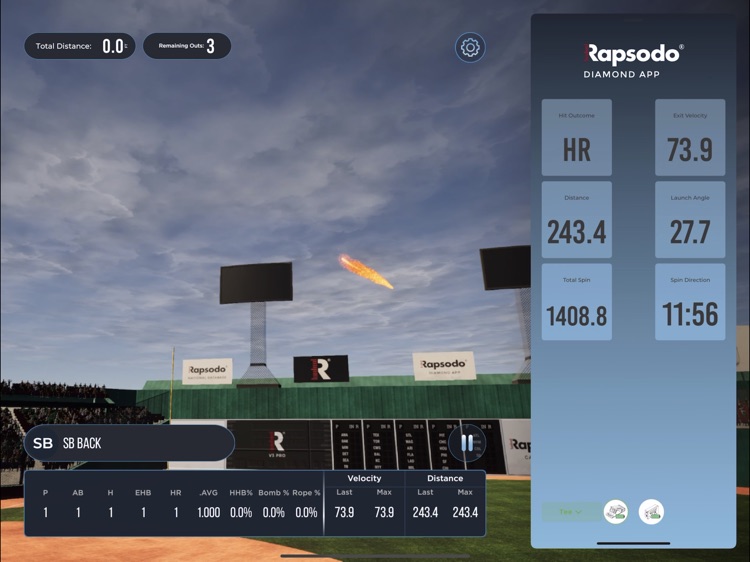
Rapsodo Game Mode is a side-app that is build for Rapsodo. It allows batters to feel like they are training inside of real baseball stadiums around the globe in the off-season. It allows for playing tournaments and structured exercises in a simulated environment. It is connected to hardware which tracks physical base- and softballs through a camera device.
My role was to develop the entire app within Unity from start to finish. Art assets and UX design came from the Rapsodo team in the United States and the API for connecting to the hardware was developed by a team in Turki. During the development I closely worked with the API team to communicate changes and required endpoints for our side of the app to work.
Software Architecture
Game Loop
From the outset of the project it was clear that multiple game modes would have to be supported and there was a strong suggestion from the client that additional game modi would be requested in the future.
It was also clear to me that the entire game would have to be data driven from the perspective of the API. The app being just a fancy visualization with custom game mode logic based on the send trajectories from the hardware. All of which could arrive or not arrive at any time. For this reason a lot of the code had to be written in an asynchronous way, which Unity only just had added support for.
I opted to use a structure where a main loop would fetch data from the API endpoint and pass that data to the game mode which was loaded. Where the game loop has no knowledge on what happens during in the game mode. Making the game mode abstract would allow me to build many game modi based on the same base without having to change the core loop. This ended up being a very successful decision.
The game loop works in the following way:
- The app waits for the game mode to be created and registered in the API.
- It then asks the game mode what user a shot should be fetched for and communicates this to the API.
- The app then polls the hardware for a 'ready' state.
- It then fetches the 'shot' data from the hardware through the API.
- Once it receives the shot data it adds the shot data to a dictionary of launched shots per player and sends this shot and the dictionary to the current active game mode.
- It then continues to ask for shots by next user until the next user is null and the game has finished.
- It then sends the game mode specific results and posts the results to the API
- Finally the user is asked weather to re-play the game mode or quit the game mode and sets the app state back to the main menu where a new game mode with new players can be chosen.
All game modes implement a common IGameMode interface.
Game Modes & ScriptableObjects
In order to make it simple for me and future developers and maintainers to add new game modes I created a system where ScriptableObjects contain all data needed for a Game Mode to be recognized by the app.
Each Game Mode has its own
- prefab which defines the menu button that needs to be spawned in the game mode selection screen
- a game mode class which handles the game mode logic and implements the IGameMode interface
- a prefab with a InGameUIManger subclass which manages in-game UI
- a game mode settings class which contains all UI-set settings for a given game mode
- a prefab with a SettingsUIManager subclass component for filling in the settings required for a specific game mode and a game mode specific icon to be show at various parts in the app.
Editor Tool
To minimize manual labour I created a custom editor script for the prefab which automatically scans all game assemblies for classes which implement the IGameModeSettings and IGameMode interfaces such that the programmer cannot accidentally select the wrong class and can simply select their desired settings and game mode through a dropdown menu.
Localization
Demo
The video shows a walkthrough of the app.